
GSTR-3B New Update Explained: Accept Previous Month Liability Before Filing (Step-by-Step)

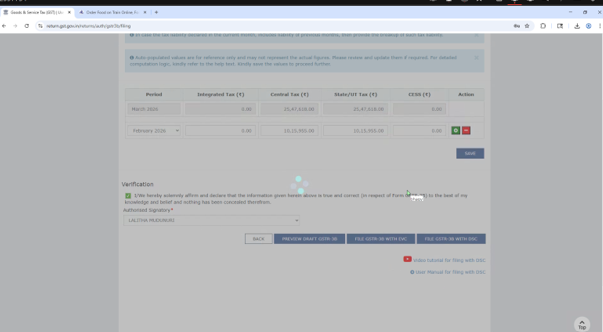
A small change in the GST portal is now creating real confusion. Recently, a client called saying “I am not able to file GSTR-3B”—the reason was simple: the system now asks you to confirm previous month liabilities before filing. This is not an error, it’s a control. If invoices of earlier months are reported in current GSTR-1, the portal pushes that liability into GSTR-3B with a breakup. Unless accepted, filing will not proceed. So filing today is no longer just entering numbers—it requires understanding of timing differences.
Step-by-Step Process to File GSTR-3B (With New Feature)

Step 1: Login & Select ReturnLogin to GST portal → Returns Dashboard → Select Month → Open GSTR-3B
Step 2: Check Auto-Populated ValuesReview values auto-filled from GSTR-1, especially Table 3.1 (Outward Supplies)Do not rush—this is where mismatches start
Step 3: Understand Liability Breakup (Important New Step)Before proceeding, system shows a month-wise liability confirmation
It will highlight invoices of previous months reported now
Verify with your GSTR-1 and books
Ensure these are genuine delayed entries
Click Accept only after validation
Step 4: Verify ITC (Table 4)
Match ITC with GSTR-2B
Check reversals under Rule 42/43 or ineligible credits
Avoid excess claims—this is where most notices start
Step 5: Interest & Late Fees (If Any)If there is delay or past liability, compute and add interest manually if not auto-calculated
Step 6: Offset LiabilityGo to Payment of Tax
Use Electronic Credit Ledger first
Balance through Cash Ledger
Ensure sufficient balance before offset
Step 7: Preview & Final CheckDownload draft → Cross-check with books and working papersThis step avoids future notices
Step 8: File with EVC/DSCOnce satisfied → Proceed to file → Use EVC/DSC
Practical Advice for Accountants
This new feature is a clear signal: GST is moving towards strict system-based matching. Month-end adjustments will now be visible and tracked. Especially in March, when multiple corrections happen, this screen can become heavy and confusing. The only solution is monthly discipline—timely GSTR-1 filing, proper reconciliation, and clear tracking of delayed invoices.
If a client says “return is not getting filed”, don’t jump to technical issues—first check whether liability confirmation is pending. In most cases now, that is the real reason.
Comments